WAN 3.0 Prompting Guide
The next series of video generation model from Alibaba WAN is powerful, but can take a minute to master. It's not the best model for complex scenes or motions, so if you're looking for that, Seedance 2.5 is still the 🐐. What it is good at is video to video editing. It also costs less than Seedance. There are many capabilities to explore, so come on this journey to see what it can do.
The goal of this post is to be practical and highlight what the model is actually good at. As well as give you some reference prompts. Some of the more exiting examples are towards to end, so feel free to scan the article for videos that catch your eye.
Feel free to follow along or try this model on Oxen.ai here:

The pricing is compelling. Here's the breakdown of prices on Oxen.ai:
| Resolution | WAN 3.0 | WAN 3.0 Prime | Seedance 2.5 | You save |
|---|---|---|---|---|
| 480p | $0.06 / sec | $0.09 / sec | $0.11 / sec | 45% |
| 720p | $0.11 / sec | $0.18 / sec | $0.25 / sec | 56% |
| 1080p | $0.22 / sec | $0.36 / sec | $0.61 / sec | 64% |
The WAN 3.0 Prime model gives the same quality at a faster inference speed, at a slightly higher price. Prime is 5-7 times faster than the regular model and can do a 15s 720p video in ~2 minutes.
To give you some real numbers, a 30 second video to video edit at 1080p with Seedance is > $18, where with WAN it is $6. If you are doing a lot of VFX cleanup 64% savings adds up quick. Here's an example of a video edit keeping rest of the scene consistent:
After testing it for the week, I put together some practical tips for prompting that will elevate your WAN 3.0 game. If you want to be lazy, point your agent at this url and have it rewrite your prompts for you.
Model Features
WAN 3.0 is an omni model that can generate up to 30 seconds of continuous video in 1080. "Omni" means it can take in images, videos, and audio files as references. It can also generate synced audio with video. From early tests, it's good at keeping the pixel details from input images consistent. Its good price and powerful editing make it a strong candidate to replace Seedance 2.5 for VFX work.
| Feature | Value |
|---|---|
| Duration | Up to 30 seconds |
| Resolution | 480p, 720p, 1080p |
| Reference Images | Up to 10 |
| Reference Video | Up to 5 <= 15 seconds |
| Audio Clips | Up to 5 |
| Aspect Ratios | 16:9, 9:16, 4:3, 3:4, 1:1 |
Let's explore the prompt space
The more details you give the model, the better it performs. That said, there are some prompt structures and tips that will get you the best performance. We'll start with simple examples and move to complex ones.
Basic - Text to Video
For simple text prompts the formula is as follows.
Subject + Scene + Motion
First describe the subject, then the scene, then the motion. In that order.
Subject: The main focus of the video. This can be a person, animal, plant, object, or an imagined entity.
Scene: The subject's environment, including background and foreground. It can be a real physical space or an imagined fictional setting.
Motion: This covers the subject's own movements and any general movement in the scene. It can be still, show small movements, partial actions, or involve large, dynamic action.
Prompt:
A Highland ox with long shaggy auburn fur stands in a misty Scottish glen at dawn, slowly turning its head as wind ripples through its coat.
What a dapper gentleman of an ox. This was pretty simple. Let's get more descriptive in our next prompt formula.
Advanced - Text to Video
What if you want to add sound, have a point of view on style, and rhythm?
Subject + Setting + Motion + Aesthetic Control + Stylization + Sound
- Subject description: Appearance, clothing, materials, defining traits, and continuity details.
- Scene description: Specific environmental qualities, background elements, time, weather, and spatial relationships.
- Motion description: Direction, amplitude, speed, force, rhythm, and physical consequences.
- Aesthetic control: Light source, lighting environment, framing, camera angle, lens choice, depth of field, and camera movement.
- Stylization: The visual language - such as sports animation, cyberpunk, line illustration, claymation, or post-apocalyptic cinema.
- Sound: Dialogue, narration, ambient effects, impact sounds, and background music, including voice character when needed.
Let's look how we can apply these 5 elements to make a dynamic dance video.
Love this one. It nailed the style, physics, motion, and even occlusion of dancers passing by each other. Still all text to video, which does not give you the most control, so let's move into reference images. Here's the prompt.
A hardcore, high-fashion dance sequence featuring a five-member international pop dance troupe of adult women with an MV-concept aesthetic. The backdrop alternates seamlessly between pure black and pure white studio settings, rendered in a high-contrast black-and-white palette with hard lighting that evokes the texture of editorial fashion photography. The musical rhythm is driven by industrial electronic basslines punctuated by abrupt, heavy drum hits. The five members are arranged in a staggered, multi-layered formation reminiscent of a magazine cover spread. The center member exudes an effortlessly languid yet piercing gaze; her short hair is slightly damp and sleeked close to the scalp, while her long fingers are adorned with elongated silver nail art. To her left, one member wears a black wide-brimmed hat pulled low over her brow bone, with wavy hair cascading down to her waist. To the right, another sports a blonde buzz cut that accentuates a sharp jawline. The two members positioned in the front feature black shoulder-length straight hair and highlighted long curls, respectively; both maintain a unified expression characterized by high brow bones and cool, aloof detachment—lips pressed tight, eyes cast diagonally downward at a 45-degree angle toward the camera. All five are styled in black velvet hats or high-neck satin jumpsuits paired with tailored leather blazers and silver belt buckles. During spins and arm swings, the satin hems and cutout tailoring will dynamically deform in response to movement. The floor consists of dark reflective tiles that create a subtle delayed reflection effect without producing a mirror-like surface. On the first beat of the drum, all five hold a sculptural starting pose facing away from the camera; they then snap their heads in unison through a 90-degree turn to reveal their profiles, simultaneously adjusting their hats with their fingertips to lock into the preparatory position for one full beat. At the stressed syllable of the first lyric line, the center member slowly traces a finger along the seam of her sleeve, holding still for two beats at the phrase’s end; meanwhile, the flanking members execute subtle isolations, shifting inward via shoulder movements to hit the beat precisely. At the syncopated point of the second phrase, all five simultaneously form symbolic hand gestures, their silver nails carving brief, sharp arcs through the air. As the interlude begins, energy initiates from the center member’s fingertips, travels up through her arms to her shoulders, then travels through her torso and stance to complete a full-body wave—all within four beats. This motion sequentially ripples outward to the adjacent members, forming a chain-reaction transmission. Concurrently, the formation glides along an arc from its initial staggered arrangement into a tight diagonal line. As the outer members pass beside the center, they shift sideways to yield space, executing a seamless crossover without disrupting the central focal point. At the densest cluster of drumbeats during the chorus, the five explosively fan out from the diagonal into a maximized semicircular formation. Satin hems flare outward in sweeping arcs as they spin, while the tailored blazer panels create strong geometric lines as arms rise. In the instant of the hair flip, the camera abruptly cuts from a fixed wide-angle overhead shot to a slow-motion close-up, capturing the suspended tension of mid-air strands and billowing fabric. This is followed by a sudden freeze frame lasting two beats, during which visible chest tremors from breathing remain perceptible. Entering the bridge section, the center member steps back twice to yield position; the long-haired member on the right crosses behind her via a cross-step, completing a center-position rotation within five beats. The new center executes an independent showcase move, leaning backward before springing upright with controlled momentum. In the closing segment, all five rapidly retrace their paths in reverse, converging into a V-shaped formation. The camera orbits smoothly around the group, gradually pushing in toward the new center’s face, ultimately freezing on the exact moment she locks eyes with the lens in a fierce, unwavering stare. Simultaneously, the lighting shifts from overhead illumination to backlit rim lighting, sustaining this final visual punctuation for two beats before fading out. Throughout the entire sequence, camera work is meticulously structured: opening with a fixed medium shot mimicking editorial cover composition; cutting to tight close-ups during verse segments to highlight precise hand gestures; employing orbiting tracking shots during the interlude to follow the wave transmission; switching from wide-angle fan formations to abrupt slow-motion close-ups during the chorus; using orbital tracking to follow the new center during the bridge; and concluding with a gradual push-in culminating in a frozen portrait. The entire piece maintains a consistent aesthetic of high-contrast black-and-white imagery with crisp, hard-edged lighting and a cool-toned studio atmosphere—no soft diffusion, no filters applied. Reflective highlights along fabric edges and nail surfaces remain consistently sharp and distinctly legible throughout.
Image-to-Video / First & Last Frame
The supplied frame(s) will establish the subject, setting, and visual style. Your prompt can concentrate on camera movements or what changes.
Let's take driving a character's motion for example. Say we want to get this woman to put up her goggles and look off into the distance. You can use a model like GPT-Image-2 to get the starting and end frames, and let the model fill in the middle.
Start with her goggles on.
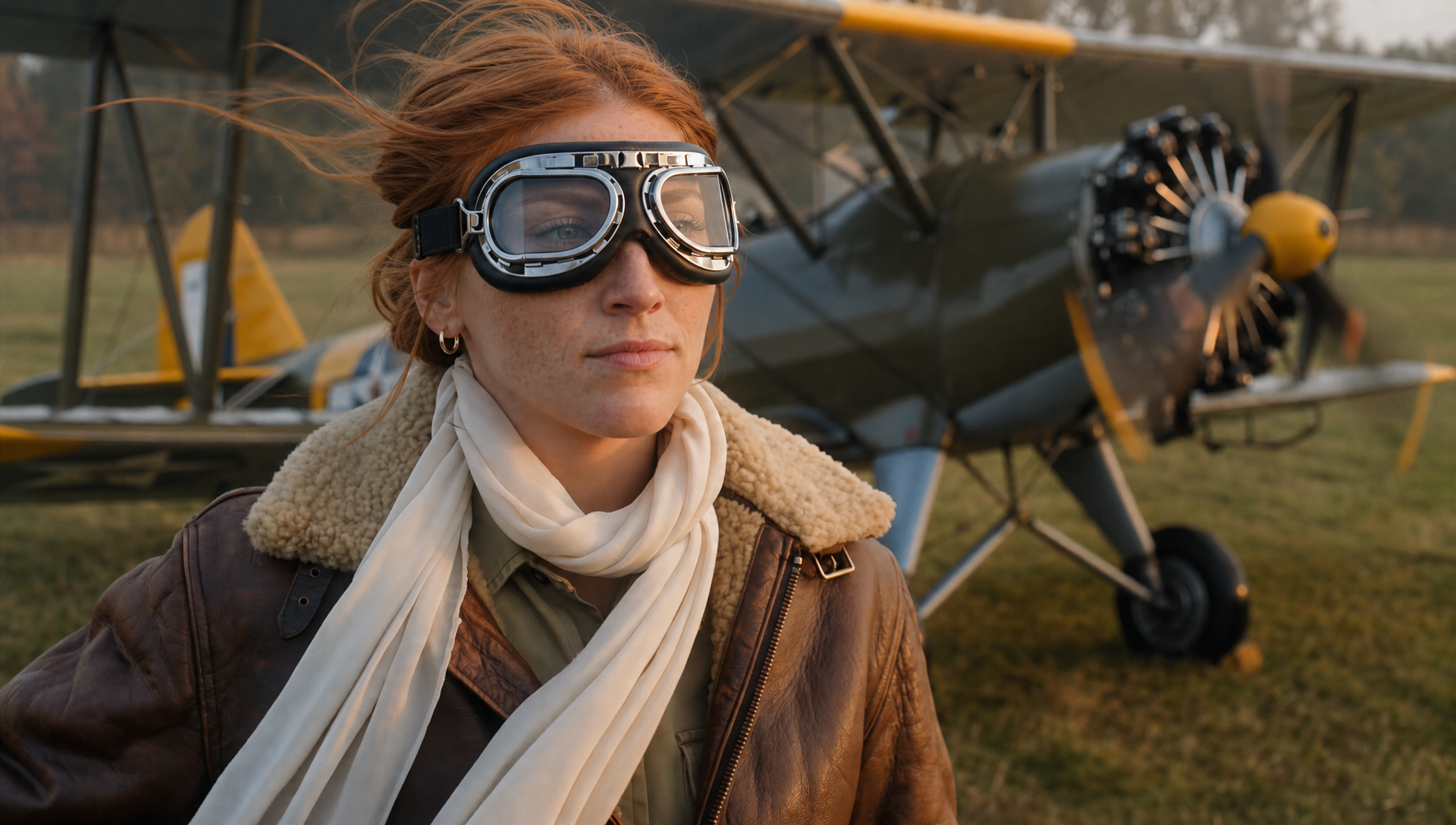
End with them off.
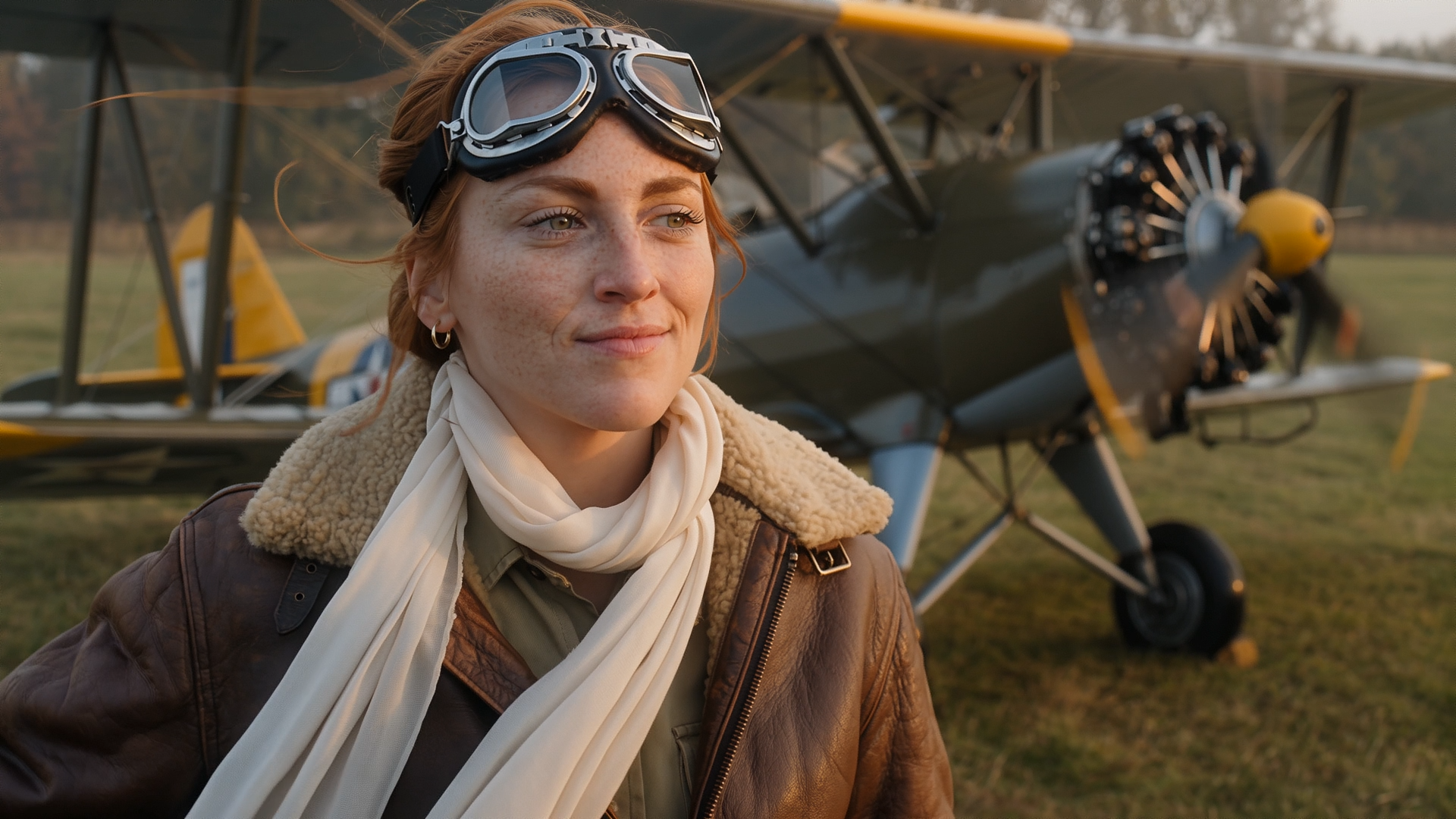
Here's our prompt:
The woman puts her goggles on top her her head, with her hair blowing in the wind, and looks satisfied off into the distance.

Make sure the plane propellers are spinning fast on the plane behind her.
I'd say she seems satisfied with the days work.
The first time I tried this, the propellers on the plane stayed static. I used GPT-Image-2 to edit the first and last frame, but it didn't update the propeller location. Because of this, the propeller ends up not moving in the video.
The failures out of the model can be quite fun as well. Maybe she has the power to stop time.
If you skip details like this in the prompt, the model takes the first and last frames too literally.
What if we want to control the camera and make the shot more dynamic?
Motion Description + Camera Movement
- Motion description: State what moves, in which direction, how quickly, and with what intensity. Adverbs such as slowly, sharply, or rapidly help control pace.
- Camera movement: Name movements such as dolly in, pull back, orbit, tilt, or pan left. Use “static shot” or “fixed shot” when the camera must not move.
Let's take the ending frame and now ask the camera to "pull back slowly".
Have the camera pull back slowly as the plane propeller continues to whirl in the background, revealing more of the background.
You can start chaining shots together with these techniques, while maintaining control.
Shot Transition
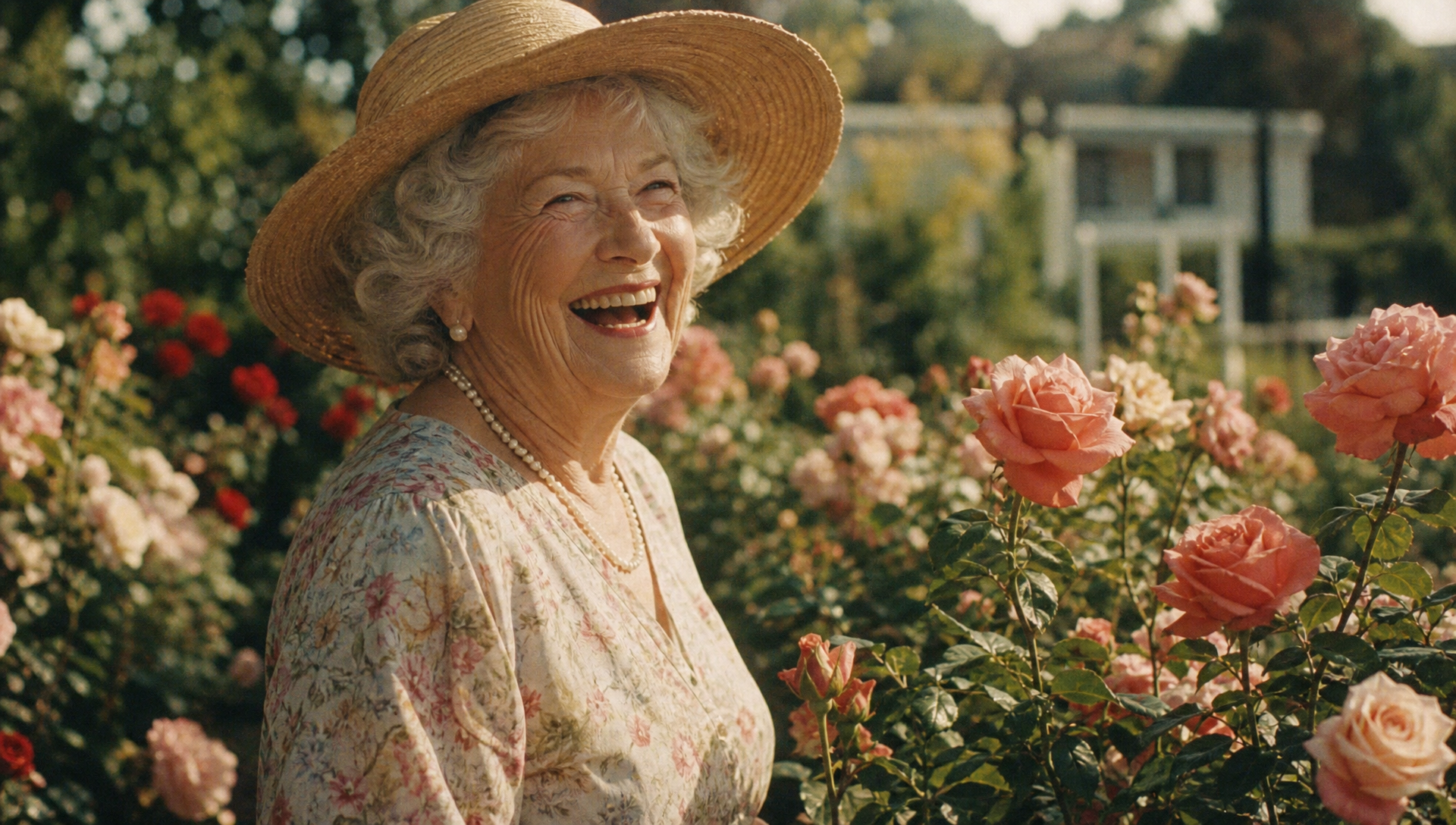
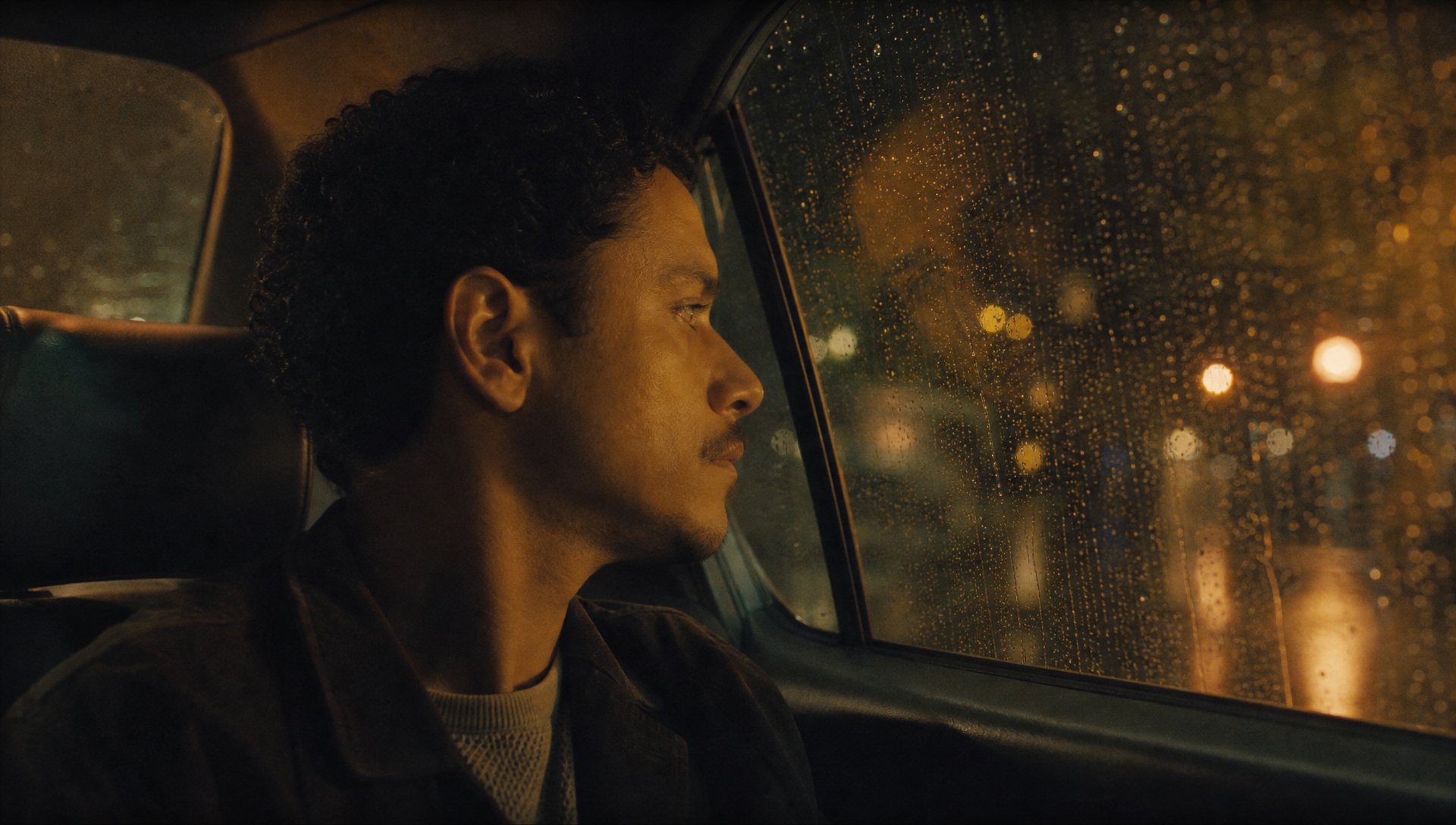
Here's a fun example of first frame to last frame. Using it transition from a woman in a rose garden to a man in a car with a nice camera effect.
In our first frame, Grandma is having fun.
In the final frame, this man is wishing he was in a rose garden.
How did we do it?
From the sunlit rose garden of the opening frame, the camera drifts slowly past the laughing woman's turning face as the light dims and the roses soften into golden bokeh; rain begins inside the transition, the bokeh resolving into streetlights seen through a wet car window at night, ending exactly on the closing frame of the man watching the rain, his reflection faint in the glass. One continuous emotional dissolve between memory and present; garden birdsong and her laughter crossfade into rain on the roof and a slow wiper rhythm.
Sound Design
The audio out of this model is hit or miss in my opinion. Seedance 2.5 overall reamins the best audio model, but there is still some juice to squeeze out of WAN.
- Voice: Exact spoken or sung line + emotion + intonation + speech rate + timbre + accent.
- Sound effects: Sound-source object + action + environmental context. Example: glass falls onto a wooden floor and shatters in a quiet room.
- Background music: State music plus style and, when useful, its timing or intensity. Example: suspense music in a gloomy corridor on a rainy night.
For voices, it helps if you specify the dialect or accent of the voice. Unless you specify the accent or details, you'll almost certainly get a robotic-sounding AI voice.
A man is talking about his insomnia. He says, "love is not getting but giving." The tone is relaxed, the pace is moderate, the voice is bright and clear, in southern American English, like he is from Texas.
Adding the "the voice is bright and clear, in southern American English, like he is from Texas" seemed to work well here. The output is photo-realistic, and decent sounding accent!
What about sound effects? Let's see if we can get this mischievous kid to break the window with his baseball with a nice shatter sound.
Beautiful. Or disastrous. At least we didn't actually have to break an old home's window for this footage. Below was our reference image.
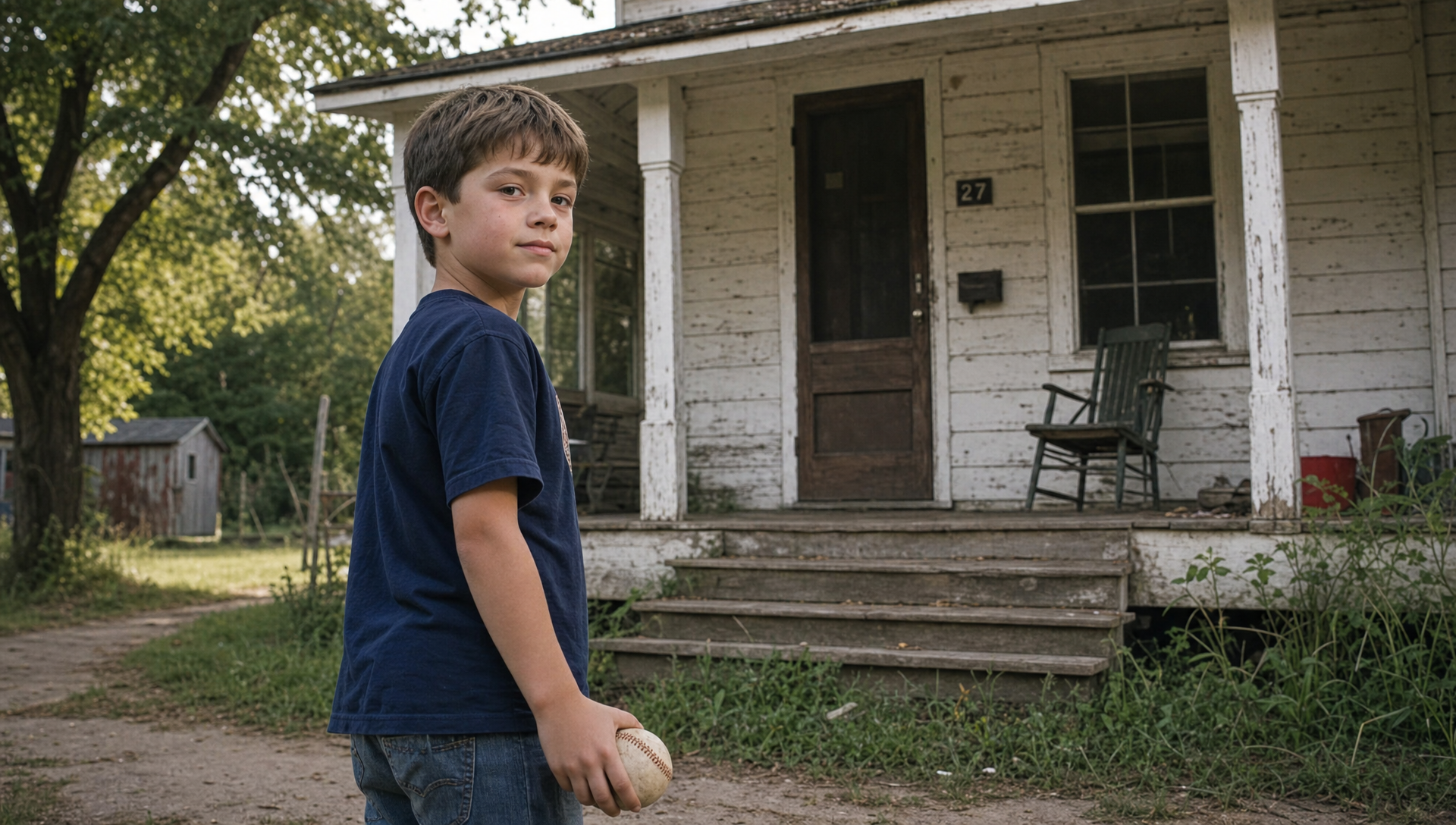
The prompt is explicit about the action, camera movement, and sound effects.
Single continuous shot, no cuts. A boy about ten years old, in a faded baseball jersey, jeans, and scuffed cleats, stands in a suburban backyard with a white-paneled house behind him and a large living-room window facing the yard. Afternoon sunlight, realistic live-action cinema, natural color, shallow depth of field.

He turns sharply toward the window, plants his back foot, and fires the baseball at the glass with a hard overhand throw. The instant the ball leaves his hand, the camera locks onto it in a tight close follow: the baseball stays large and centered in frame as it travels fast and straight toward the window. Keep tracking with the ball until it slams into the pane.

On impact the glass shatters: a spiderweb crack blooms, then shards explode inward and outward, glittering in the sunlight, with the ball punching through the hole. End on the broken window and falling glass.

No dialogue throughout the entire video. No background music. Keep backyard ambience, the grunt of the throw, the whoosh of the ball in flight, and a sharp glass-shatter impact.
Mixing Sound with Animation
To see how well the model can sync audio + video, here's a fun prompt that combines live action with 2D hand drawn animations.
It is impressive how well the model orchestrates the sound effects with the video. I love the effect of 2D hand drawn animation mixed with the real world.
Generate a 15-second, 16:9 horizontal short film combining "low-light authentic indoor photography × rough hand-drawn MG animation × first-person interactive VFX." The entire film is shot from a first-person POV perspective, simulating the use of a compact action camera or handheld ultra-wide-angle lens during continuous filming inside a residential home at night. This is not a polished commercial; rather, it is a personal creative video characterized by spontaneity, immediacy, and a slight sense of losing control.
Live-Action Space & Color Grading
The setting is a modest-sized residence at night, where the living room, dining table, computer workspace, narrow hallway, and kitchen are interconnected. The space feels slightly cramped, with asymmetrical furniture arrangements that retain traces of real life.
Walls are matte beige-brown and light coffee-colored, featuring subtle paint grain, uneven shadows, and minor signs of wear. Furniture consists primarily of dark aged wood, black leather, and dark fabrics; wooden tabletops show fine scratches, uneven reflections, and everyday clutter. Avoid excessive tidiness, showroom aesthetics, or high-end vacation rental vibes.
No bright overhead lights are used. Primary lighting comes from warm yellow wall sconces, small desk lamps, a laptop screen, and a string of irregularly hung red, yellow, green, and blue mini bulbs along the ceiling. Outside the windows is complete darkness. Most of the room remains in low-light shadow, with only specific areas illuminated by wall lamps.
The overall color palette is dominated by dark brown, caramel, amber orange, and deep black. Shadows must not be fully lifted; corners, spaces beneath furniture, and hallways must retain large areas of deep shadow. The computer screen provides a touch of cool blue light, while opening the refrigerator triggers a sudden burst of cold white light, requiring brief auto-exposure adjustment.
The footage retains characteristics of consumer-grade cameras in low light: slight high-ISO noise, colored grain in shadows, limited dynamic range, minor color shifts, lens vignetting, compressed textures, and imperfect motion blur. Cinematic noise-free quality, crisp commercial photography, and any 3D-rendered or plastic material aesthetics are strictly prohibited.
POV Camera Work & Authentic Handheld Shake
Use an approximate 14–16mm ultra-wide-angle lens with slight fisheye distortion and barrel warping; furniture and doorframes at the frame edges should curve subtly. The camera is positioned at adult eye or chest level—the viewer is the character in motion.
Camera movement must never be gimbal-smooth. Maintain irregular, authentic handheld motion throughout:
Even during static observation, include subtle breathing sway and weight shifts;
When raising an arm, the camera drifts slightly in the opposite direction;
Walking introduces gentle vertical bobbing and slight rolling with each step;
Panning accelerates then decelerates, ending with a tiny overshoot and rebound;
Hand movements occur first, with the camera following after ~0.1s delay to simulate realistic reaction time;
Quick head dips, lifts, and turns produce directional motion blur and mild rolling shutter distortion;
When approaching the computer, walls, or fridge too closely, allow skewed framing, cropping, and momentary focus loss;
Auto-focus takes ~0.2s to re-lock after movement ceases.
Shake must stem from breathing, footsteps, turning inertia, and startle responses—not rhythmic vibration or constant high-frequency jitter. The lens should feel genuinely unstable while keeping core actions legible.
Only the same person’s real right hand or both forearms appear in frame. Arms retain unretouched live-action skin texture, including pores, fine hair, joint details, and warm-light shadows. No white outlines, cartoon strokes, or cutout edges on arms. MG lines may wrap around arm movement but must never outline the entire hand like a sticker.
Hand-Drawn MG Texture
All animation is rough, 2D frame-by-frame hand-drawn art—not smooth vector animation, 3D cartoons, or plastic stickers.
Strokes combine crayon, oil pastel, chalk, and dry brush techniques. Line width varies; edges show bristle splits, granular gaps, broken strokes, overdrawn layers, and semi-transparent patches. Contours shift slightly every frame, creating noticeable yet restrained "line boil."
Animation jumps at roughly 10–12 hand-drawn frames per second, while the live-action background moves continuously. Stroke motion must avoid perfect curve interpolation, retaining the slight stutter, stretching, and positional drift inherent to frame-by-frame drawing.
Colors feature chalk white, bright yellow, cyan blue, vivid red, and fluorescent pink—all rendered as rough matte pigment without specular highlights, plastic reflections, volumetric depth, soft shadows, or intense neon glows.
Simple creatures may use black outlines, but these must vary in thickness, break intermittently, and wobble—never forming smooth, uniform cartoon borders. Butterflies, octopuses, hamburgers, and giant mouths should resemble impromptu children’s doodles or indie animation keyframes, not commercial emojis.
Animation must obey real camera perspective:
Scale up rapidly when near the lens, shrink noticeably when distant;
Occlude correctly behind doorframes, arms, tabletops, and fridge doors;
Exhibit motion blur and trailing during camera whips;
Enter from frame edges, partially exit, or get cropped—never permanently centered;
Graphics on walls or screens must conform to surface perspective, never floating parallel.
0–2s | White Strokes Wrapping Around Arm
Shot opens in a dim living room, composition tilted slightly left. Only part of a computer screen visible in bottom-right; deep background shows dark window, dining table, and warm yellow wall lamp.
Character raises right arm; camera dips and shifts laterally due to weight transfer. Index finger traces an arc in air as a rough white dry-brush stroke grows in real-time from fingertip.
White line does not trace arm contour but loops loosely through fingers, wraps behind palm, then coils continuously around wrist and forearm. Sections behind the arm are naturally occluded by skin. Line jitters every frame, revealing bristle marks and pigment gaps.
Hand opens; an irregular yellow hand-drawn star pops from palm. Star edges are rough, interior showing layered crayon texture—no smooth solid-color icon.
2–4.3s | Star Enters Computer, Blue Strokes Burst Out
Fingers mime pinching the star, then flick swiftly down-right. Camera lags half a beat dipping downward, producing pronounced downward whip, edge stretch, and transient motion blur.
Yellow star trails two hand-drawn streaks toward computer. Computer appears off-center at tilted perspective in lower frame. Upon hitting screen, star drags rough red lines across surface, quickly sketching an asymmetrical red heart.
Heart interior filled with chaotic layered strokes. Cyan dry-brush strokes spin rapidly around heart, some extending beyond screen edge. Camera pushes closer to screen, allowing keyboard and bezel cropping.
Blue and yellow strokes suddenly surge upward from screen edge; camera immediately tilts up to follow. Thick strokes graze lens at close range, briefly dominating frame—showing rough bristles and uneven pigment, not soft plastic ribbons.
4.3–6.3s | Strokes Transform into Butterflies, Guiding Turn
Near beige-brown wall, blue-yellow strokes condense into two loose white-blue hand-drawn butterflies. Wings consist of quick scribbled outlines only—no fine patterns, no uniform black borders.
One butterfly near, one far; wings flutter rapidly toward hallway. Near butterfly briefly grazes left frame edge and gets cropped; camera immediately pivots to chase. Turn executes ~90° rapid whip with strong directional blur and minor overshoot—no smooth rotation.
Camera walks into hallway with two-three footstep bobs. Butterfly partially occludes behind doorframe, reappearing on other side. Ambient brightness naturally drops upon entering corridor.
6.3–9.5s | Pink Lines & Small Octopus
One butterfly dissolves near wall lamp into a short pink crayon line. Line grows rapidly along wall, curving around corner and doorframe, forming loose arcs and spirals in real space.
Camera follows while walking, frame slightly tilted; foreground doorframe sweeps past lens. When pink line approaches closely, only partial thick strokes show—never fully centered.
Line terminus sprouts two simple white eyes and several short tentacles, becoming a tiny pink octopus. Occupying only 5–8% of frame width, it hovers distantly in hallway, bouncing gently—no large refined cartoon character.
Octopus drifts toward fridge; hand-drawn yellow arrows flash beside it. Arrows crooked, strokes rough, appearing then quickly erased. Camera hastens toward fridge, footfall frequency increasing, shake intensifying slightly.
9.5–12.3s | Hamburger Monster in Fridge
Right hand reaches for fridge handle; camera jolts mildly from body proximity. Door opens to sudden cold white light; frame briefly overexposes before auto-exposure rapidly compensates.
Fridge interior is not pristine or empty—contains drink cans, plastic containers, bottles, leftovers. On middle-back shelf sits a small hand-drawn hamburger occupying ~15% of interior area—not centered in extreme close-up.
Burger has orange-yellow bun, red tomato, green lettuce, two asymmetrical round eyes, tiny limbs. Colors retain crayon texture; black outline jitters constantly.
Burger sways innocently, then top/bottom buns split open revealing dark mouth and mismatched rough white triangular teeth. Monster hops forward once; camera recoils in surprise, retreating and tilting sideways.
Hand immediately shoves fridge door shut. Panel sweeps across right frame, causing real occlusion, impact shake, and transient blur. Monster never lingers front-and-center.
12.3–15s | Hand-Drawn Eye & Giant Mouth Attack
After door closes, camera whips around instantly. ~120° turn with pronounced handheld whip, rolling shutter tilt, and shadow smearing. Lens overshoots target slightly, then swings back.
Living room wall displays a rough white hand-drawn eye. Composed of unclosed dry-brush contours with simple cyan iris and black pupil—not realistic, no lashes, eyeball highlights, or refined gradients.
Pupil darts left-right, then locks onto camera. Camera exhibits tense micro-retreat and unsteady breathing.
Below eye, fluorescent pink thick line extends laterally, forming huge curved mouth. Interior filled with rough dark shading; two rows of mismatched, crooked white triangular teeth with visible chalk grain.
Mouth pauses ~0.2s, then lunges off wall toward camera. Camera jerks backward violently, frame shaking intensely. In final 0.6s, mouth undergoes extreme perspective enlargement—only partial pink lip corner and white teeth enter frame, rest cropped by edges.
Footage cuts abruptly at instant teeth nearly bite lens—no fade-out, no black screen, no text.
Sound Design
No dialogue, no prominent melodic score. Retain nighttime indoor ambient noise, footsteps, breathing, fabric rustle, fridge door, and hand swooshes. MG animation accompanied by crayon scratching, dry-brush sweeping, elastic stretching, paper flapping, and brief cartoon impacts. Final mouth lunge adds rapidly building low-frequency thump and air whoosh.
Mandatory Restrictions
Live backgrounds must lack 3D rendering, game-scene, plastic model, or AI-showroom aesthetics; walls, wood, leather, skin, and fridge must be matte, natural, imperfect live-action materials. Camera cannot be gimbal-stable, perpetually level, or auto-center every subject.
Arms must have no cartoon white borders, outlines, or cutout contours; white animation wraps around arm only, never tracing skin edges.
MG animation prohibits smooth Bézier curves, uniform strokes, pure vector fills, gradient plastic, 3D volume, specular highlights, soft drop shadows, HD commercial cartoon, or emoji styles. Butterflies and octopus must not become oversized, overly refined, or always face camera. No human faces, subtitles, logos, watermarks, flash-white transitions, or standard hard cuts.
Multi-Shot Control
With up to 30 seconds of continuous generation, you may want to chain multiple shots together. You will want to structure narrative prompts as an brief followed by ordered, timed shots. Repeat continuity requirements for subjects, setting, and atmosphere when they must persist across cuts.
- Overall description: Summarize the story theme, narrative style, central emotion, and core event.
- Shot number: Give every scene or segment a clear sequential number.
- Timestamp: Assign a time range so the content and pacing fit the requested duration.
- Shot content / subject behavior: Describe framing, transition, action, dialogue, expression, posture, and relevant sound for that shot.
The shots and timestamps should be in the following format:
Shot 1 [0-3s]: A man ...
Shot 2 [3-5s]: An ox...
Shot 3 [5-6s]: Cut back to...
Here's a 15-second animated short created from a reference image and a multi-shot prompt. This lucky bartender seems to have met a new friend.
I hope the man decides to gives the cat a good home. Here's the prompt.
Shot 1 [0-3s]: After closing for the night, @Image 1 uses a cloth to carefully wipe down the bar counter. His face reveals the exhaustion of closing up.
Shot 2 [3-5s]: A faint whimpering sound of a cat comes from outside. He paused his action. He looks to the door.
Shot 3 [5-8s]: There, in the doorway, was a skinny stray kitten shivering in the rain. Slowly zooming in on the helpless gaze of the kitten.
Shot 4 [8-10s]: The weary expression gradually gives way to a gentle one.
Shot 5 [10-13s]: The man approaches the door and slowly and stiffly squats down.
Shot 5 [13-15s]: Close-up of the face. The rigid lines on his face relax, and a clumsy yet kind smile spreads across his lips, with the muscles around his eye corner also relax.
Reference to Video
Now that we've gone over the basics, "Reference to Video"
is where the model becomes more powerful. The omni capabilities of the model allow you to pass in up to 10 images, 5 videos, and 5 audio files to drive the video.
Formula: Reference Subject + Action + Dialogue
- @Reference object: Mention sources with
@Image 1,@Video 1, and@Audio 1. If you use several sources, keep them in the order you provided. Refer to each source whenever it's important. - Action: Describe the subject's motion, expressions, body movements, reactions, forces, and changes.
- Dialogue: Write exact lines and optionally bind a referenced voice, such as “use the voice from @Audio 1.”
- Video timeline reference: Specify whether the new result borrows action timing, camera movement, shot rhythm, or effects from a reference video.
This example combined four reference images to create a fashion shoot with two models. I don't know much about fashion, but these two women seem to.
A cinematic fashion blockbuster featuring two female protagonists, with an extremely fast pace and pure jump cut editing logic. Shot with the Arri Alexa 65 and Panavision anamorphic lenses, it captures the texture of Kodak Vision3 500T film, boasting 8K resolution and photo-realistic quality, with no text. The facial features of the characters are fully locked onto Girl A @Image 1 and Girl B @Image 2.

[0-3 seconds: rapid entrance and contrast] (hard cut) A stark white minimalist space is sharply shadowed by intense side lighting. Left screen/left side: Girl A wears a black deconstructed leather suit, her eyes cold and elegant under the cold light, swiftly turning to look directly at the camera. Right screen/right side: Girl B wears a flowing champagne gold silk dress, her eyes languid under the warm light, swiftly turning to look directly at the camera. Real film graininess.

[3-6 seconds: extreme close-up of material] (hard cut) Extremely close-up macro shot. Girl A's reference outfit @Image 3: Cold light casts on the sharp creases of black leather and metal accessories, presenting a cold and high-end luster. Girl B's reference outfit @Image 4: Warm light outlines the lines of her collarbone, with silk fabric flowing like water waves, and the skin exhibits a hyper-realistic translucent and hydrated texture, with visible fine hairs.

[6-9 seconds: Tension Interlace (High-Speed Photography)] (Hard Cut) The two characters walk towards each other in a pure white space and pass by each other. High-speed photography (1000fps slow motion). The toughness of black leather collides violently with the softness of champagne silk in an instant of interlace, with skirt hems and hair flying in the air. In the zero-point-one second of interlace, their eyes meet sharply.

[9-12 seconds: Back-to-back pressure] (Hard cut) The two stand back-to-back. Strong rim lighting simultaneously outlines their facial contours and highlights the golden edges of their hair. They simultaneously turn their heads quickly and look directly at the camera. Their expressions exude a strong sense of pressure, professionalism, and the confident aura of top supermodels.

[12-15 seconds: Relaxation and freeze] (Hard cut) The two people stand side by side, slightly tilting their heads to look at each other, revealing a contagious, relaxed, and confident smile. The camera slowly zooms out, revealing the perfect proportions of the two people in the grand light and shadow space, and the image gradually fades in a high-end glow.

Camera movement: Quick handheld panning, rapid zooming, high-speed photography in slow motion, pure hard cuts, without fancy visual effects.
Color: High-contrast black, white, and gray tones, embellished with cool metallic luster and warm champagne gold, with film-grade color grading.
Here's our first star:
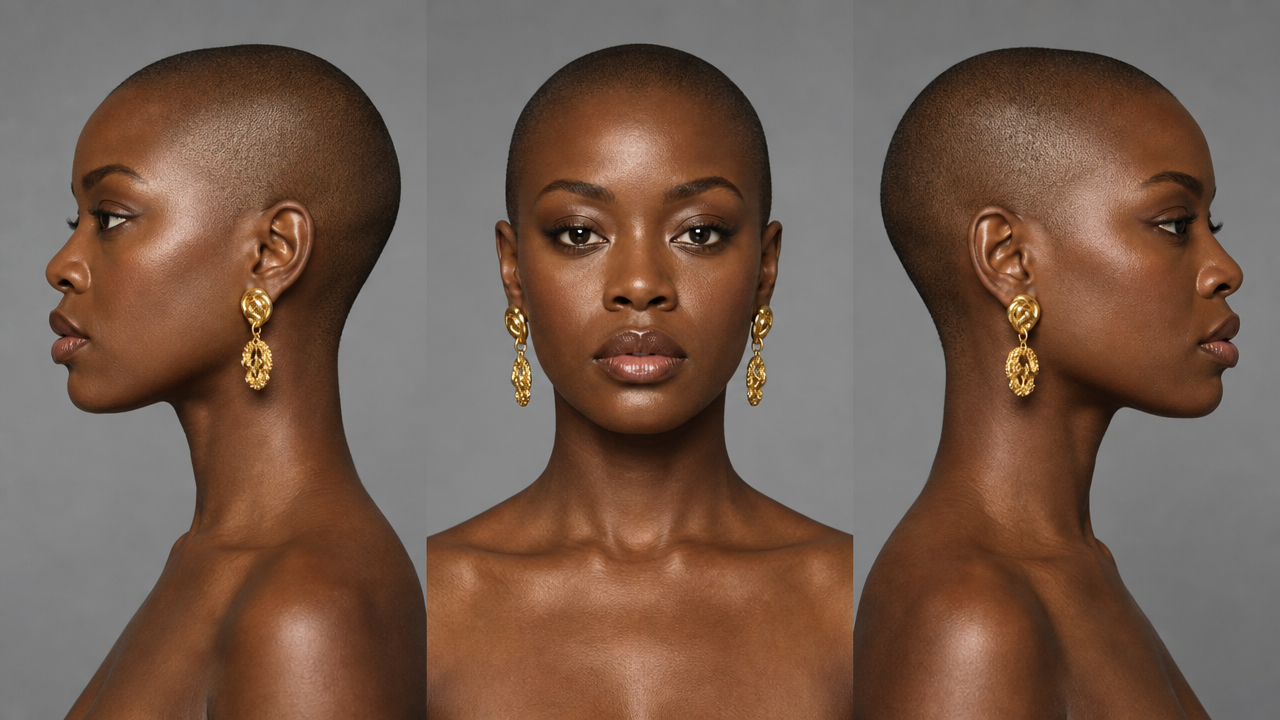
And our second:
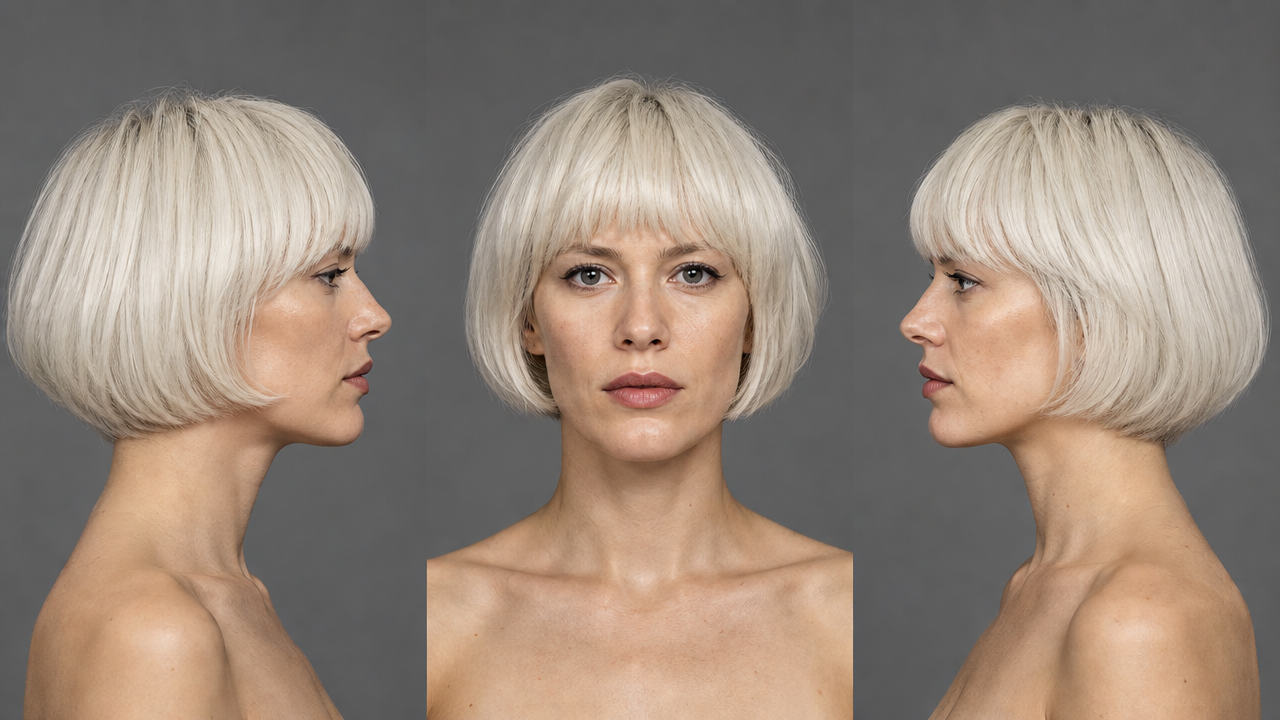
Are we team gold?
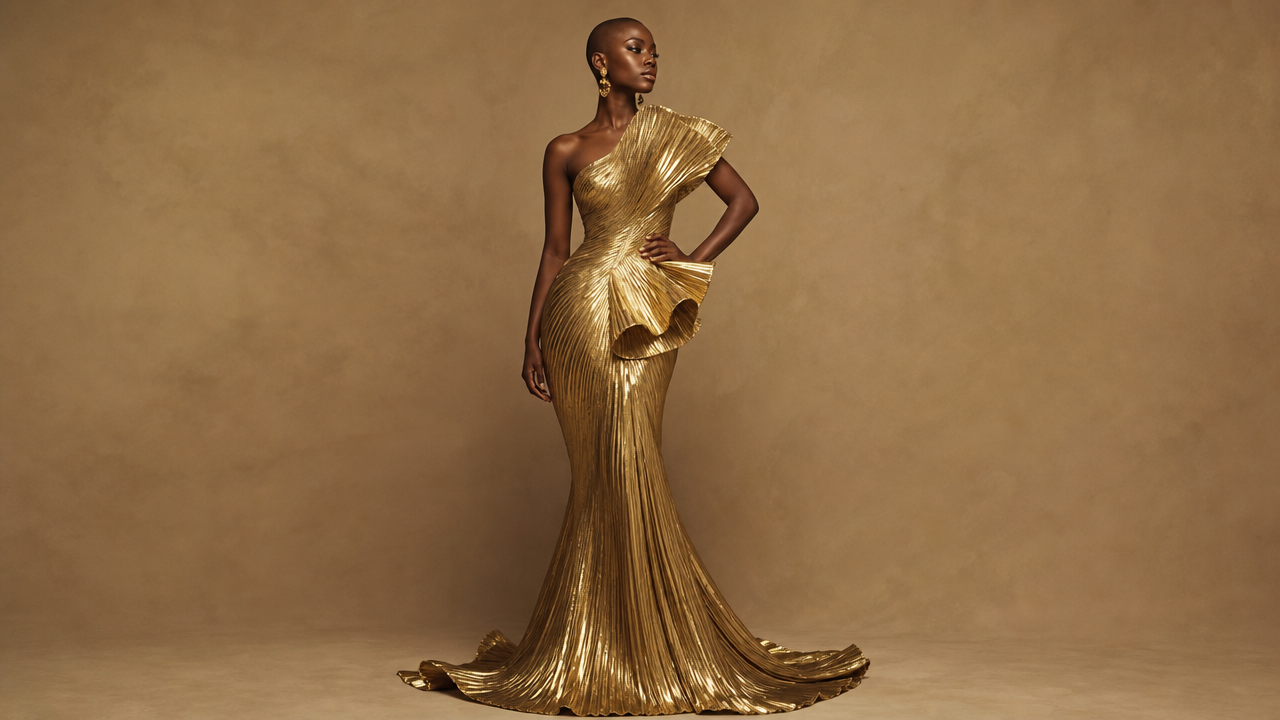
Or team black?
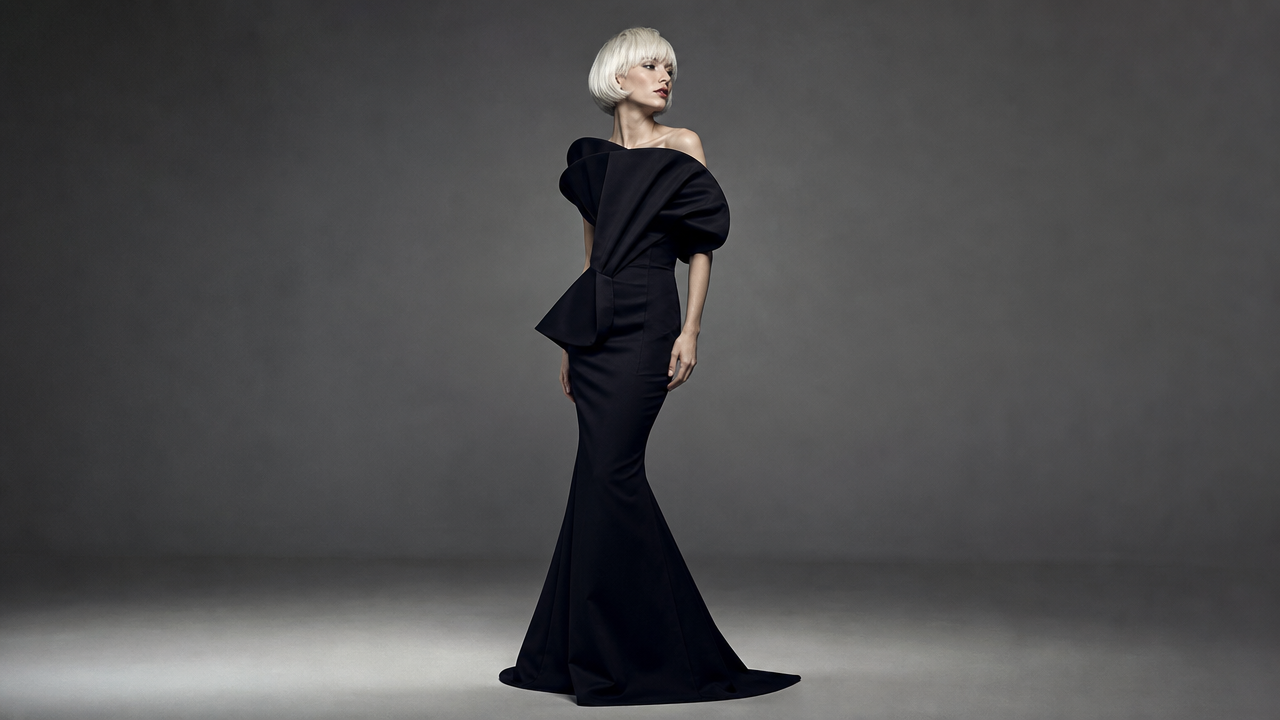
It's the gold for me, but again, fashion is out of my domain of expertise.
Audio + Image to Video
Imagine you have an actor's recorded voice and want to use it for an AI character’s performance or lip sync. WAN lets you pass in both audio plus reference images to get a performance out.
For example, here I had a single reference image of this woman, and passed in a famous JFK speech to test lip sync.
Not perfect... but pretty dang entertaining! Let's try it with an animated character.
Okay, pretty epic. The prompt here was:
Have the rabbit from @Image 1 give the speech from @Audio 1

Make sure the mouth is perfectly synced and it looks like he is talking.
Imagine creating a whole animated series where you are the voice actor. WAN is a great tool in the tool belt for this.
On the topic of JFK's famous speech. Shout out to my favorite tweet of the week.
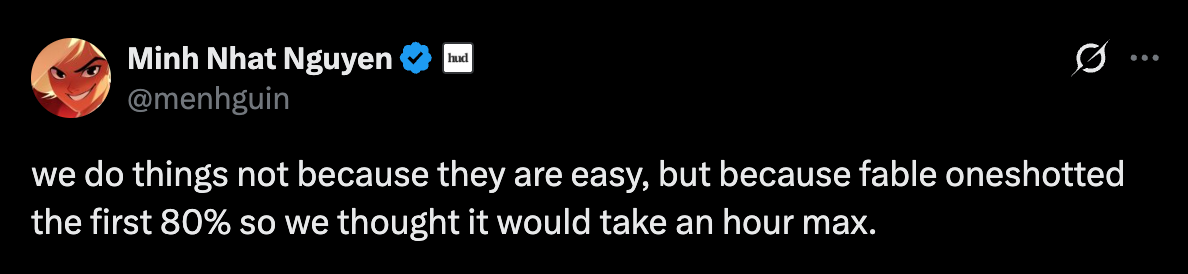
Ain't that the truth. RIP my 80% complete side projects.
Product Launch Videos & Animation
What if you have screenshots of your product, and you want to animate them into an Apple style promo video? Check this out, take screen shots of your product and generate key frames with Nano Banana 2.
Here's a fictional product, that seems like it will help me with my business. Let's take a look at our keyframes.
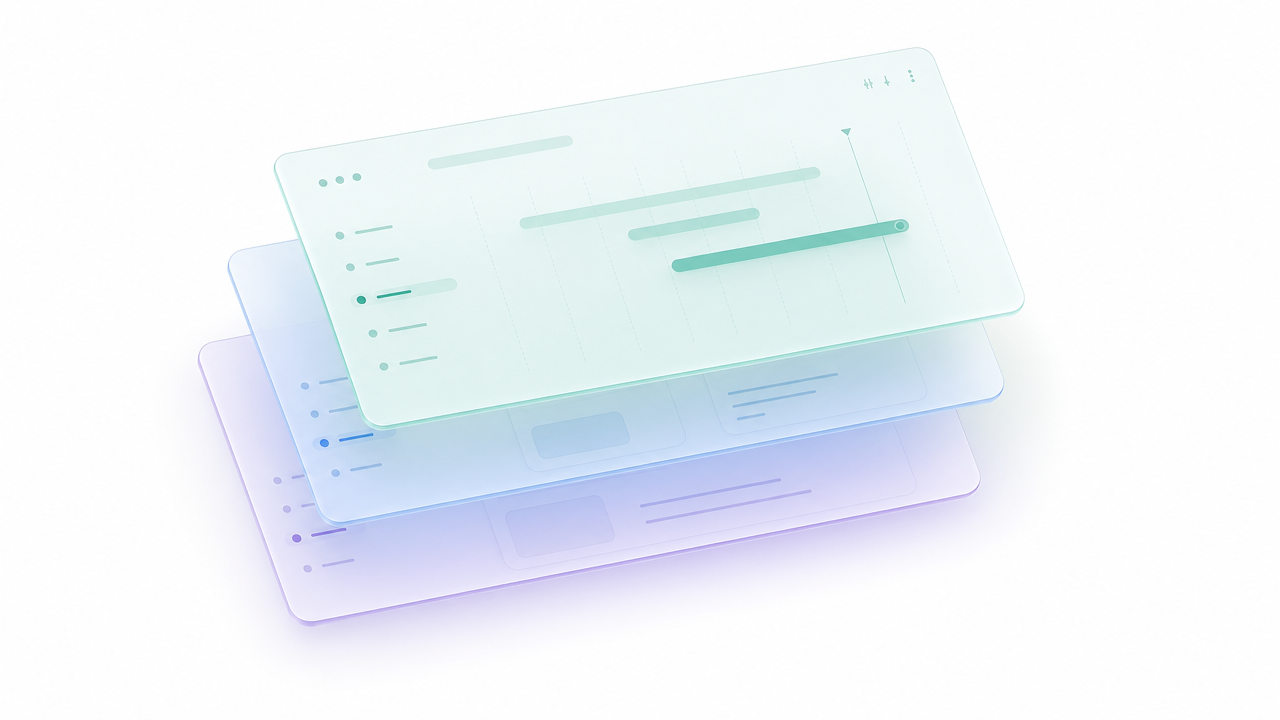
Numbers go up.

Ooo yes, graph paper.

You did it! Task complete 🎉

And finally the animation.
Not too bad for a one shot.
Generate a 9-second premium product launch motion video, pure white studio shoot, soft natural light, cinematic macro photography. Style: Google Apple/Material Design, combining colored paper craft, translucent materials, and UI interfaces, clean and refined.

Storyboard based on 4 images:
- @Image1 (0–1.48s): In the center of a white background, a compact stack of colored paper layers (white pages + blue-green-purple translucent paper), generous negative space, only a subtle breathing float, maintaining a restrained opening. @Image1
- @Image2 (1.48–3s): The paper uses a paper wipe/mask reveal to reveal UI panels. The main panel → cards → buttons/tags appear in sequence with Material ease, while surrounding paper decorations float. @Image2
- @Image3 (3–4.64s): Diagonal overhead view with spatial parallax. UI panels float above green grid paper, a blue transparent strip, purple folded paper, and orange cards, with slow camera pan + subtle push-in. @Image3
- @Image4 (4.64–8.52s): A horizontal card wall, multiple cards (content/files/tasks) slide into alignment using card cascade, layout reflow, and soft slide, transitioning midway into a task-completion scene, with a functional area and highlighted tips forming on the right. @Image4
Video to Video
The most powerful feature of WAN is being able to take in video as reference, and edit it. Here we want to swap out the actor in the video, and all we have to do is supply the reference video and an image of the new actor.
Sorry bro, there's a new skater in town.
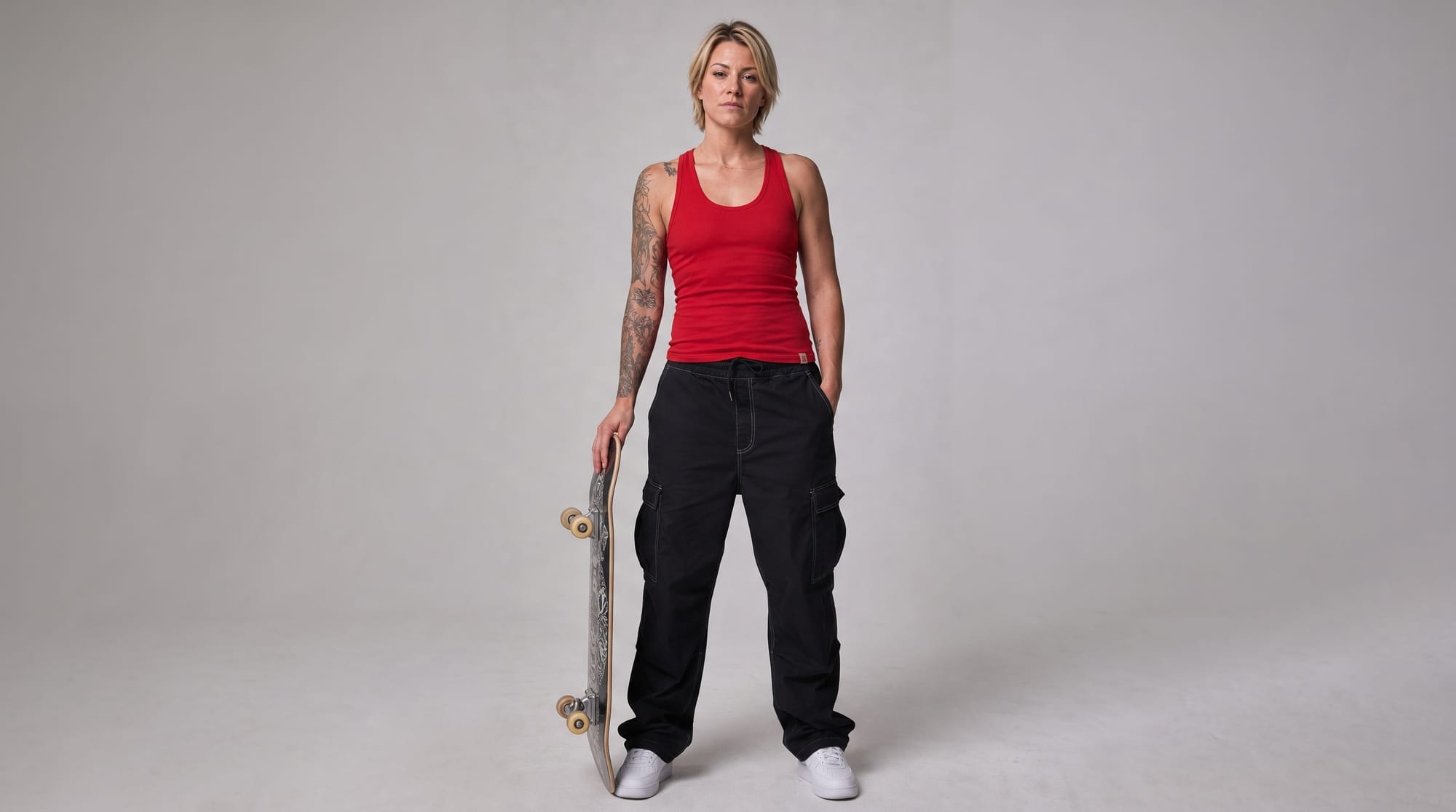
Yeah, she rips.
Check out how it keeps the performance the same.
Unreal how easy this is now. 8 seconds at 1080p costs $1.76. This would take a traditional VFX artist...more than $2. Let's just keep it at that. Charge what you want consulting kings & queens.
Adding and Removing Objects
The model is quite good removing and adding objects to a scene on demand.
Edit @Video 1: Add a boulder on the beach, half-buried in wet sand. As the waves recede, let the water gently lap over the base of the rock.
Now that's a nice boulder.
What about removing objects?
In @Video1, remove the inflatable flamingo and the beach ball from the pool. Keep everything else the same.
Voilà, pool toys no more.
Grandma seems to be pretty happy about the results.
Editing Lighting
What if you want to change the lighting on the scene but keep the performance the same? Adding phrases such as "The man's movements and frame content remain unchanged." can help keep the edit consistent.
Too dark and moody?
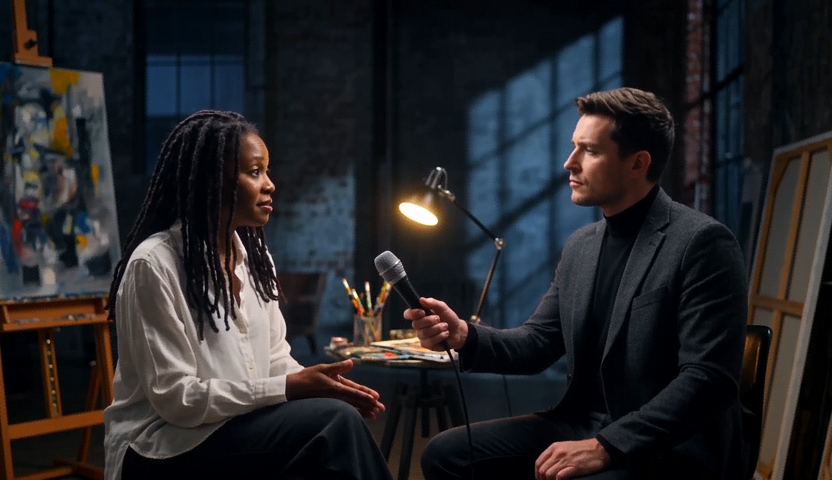
Brighten it up.
Edit @Video 1: Brighten the overall lighting with soft three-point lighting in a cinematic TV-series style. Remove the hard shadow on the right side of the man's face, ensuring even illumination across his features for a natural, translucent skin tone. Simultaneously enhance the lighting on the white tile wall and window in the background, maintaining a unified overall tonal quality. The man's movements and frame content remain unchanged.
That's better.
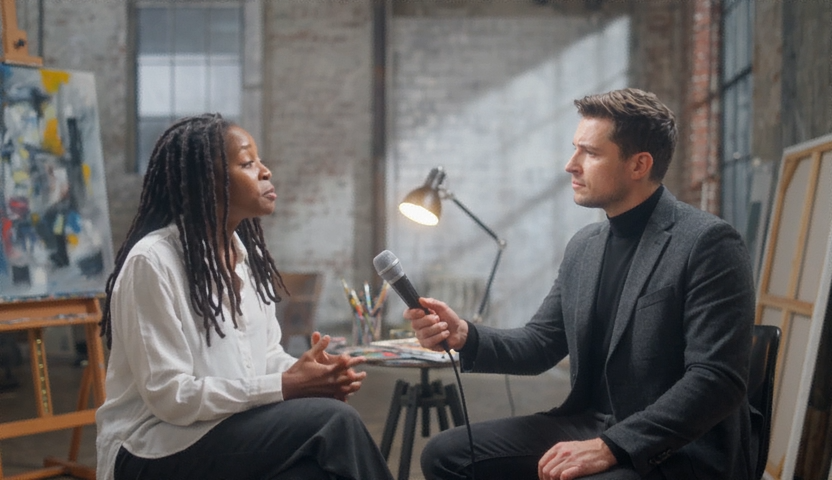
Did it keep the performance?
Here's another example of adding objects + lighting.
Adding this vase
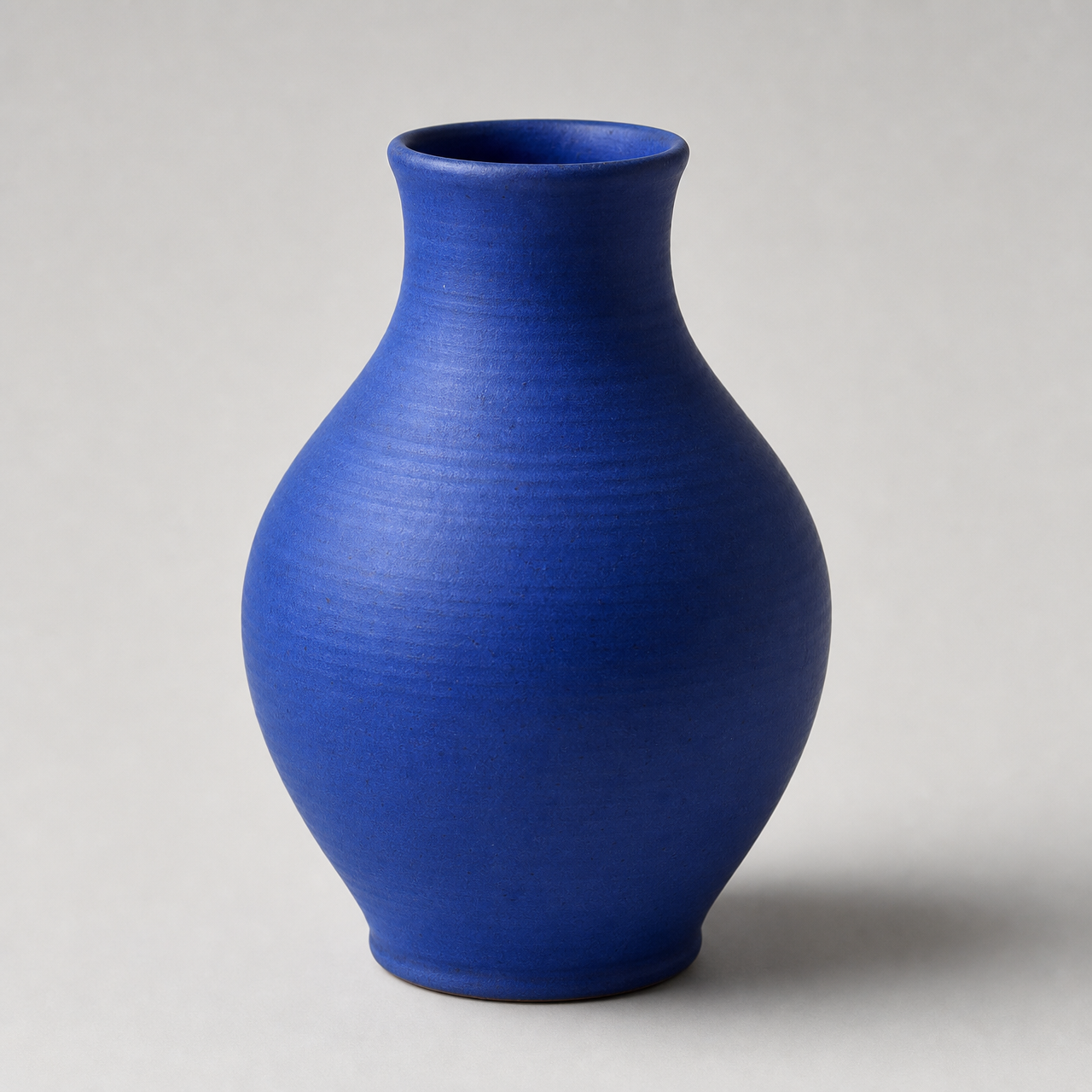
With this prompt
In the video editing, a vase from @Image 1 was added to the empty space on the table to the right of the woman in @Video 1. The vase's lighting aligns with the direction of the natural light from the window, seamlessly blending into the wooden table scene. The woman's movements and the rest of the image remain unchanged.
And boom! The vase is in the scene, with the lighting matching.
Conclusion
After playing with this model for over a week, I can see where it would be helpful in animation and/or VFX edits. If you are trying to generate a high caliber fight scene - use Seedance 2.5. If you need to edit that scene? Back to WAN. The more you know!
If you made it this far, and want to try out the model, we are offering $30 of credits for you to get started! Email hello@oxen.ai with your use case, your favorite ox-themed pun, and your username. We will add the credits to your account. But only if the pun is funny.
Happy Generating!